
How to Check When a Page Was Indexed by Google
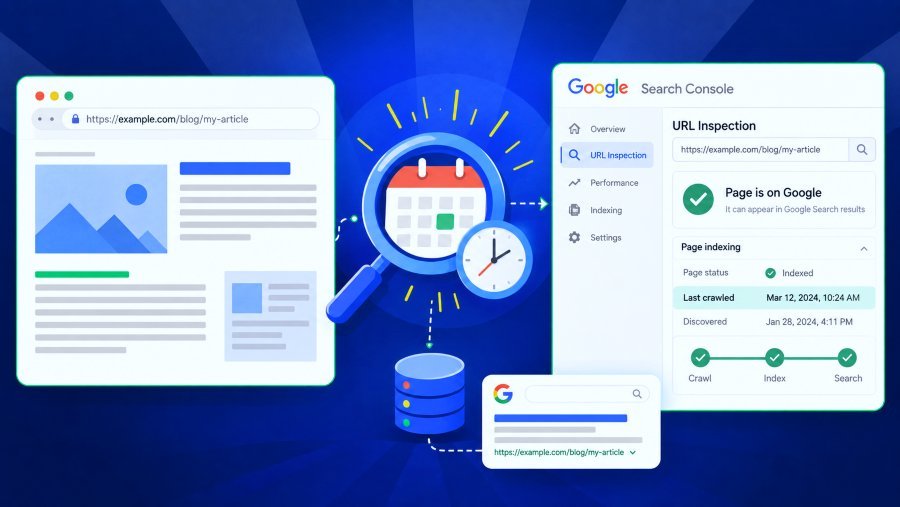
If you want to find out exactly when Google first indexed a specific URL, it's important to know that Google does not offer a historical "first indexed" timestamp for individual pages.
Google Search Console can tell you whether a URL is indexed and when Google last crawled it. The URL Inspection API includes a lastCrawlTime field, which records the most recent time Google’s primary crawler visited the page. However, this is a crawl timestamp, not the date the page was first added to Google’s index. The API does not provide a separate field for the page’s first index date.
So, don’t label any single date as the "first indexed" date. Instead, build a timeline using the evidence you have, like publication records, Googlebot crawls, Search Console impressions, index checks, and archives. Each type of evidence shows something different.
For new pages, record the index status on the day you publish. This way, you’ll have data to answer questions later, instead of guessing after the fact.
TL;DR: Which Date Should You Check?
Is the page indexed now? | URL Inspection or an index checker | Current index status |
When did Google last crawl it? | URL Inspection | Google's most recent recorded crawl |
When did Googlebot first crawl it? | Retained server or CDN logs | Earliest verified Googlebot request you kept |
When was it showing in Search? | Earliest retained Search Console impression | It was being served by that date |
When did I first see it indexed? | Repeated index-status checks | First observation of an indexed state |
When did Google actually add it? | Usually unavailable | No public first-index timestamp exists |
A date can still be useful evidence, even if it isn’t Google’s first-index timestamp.
What "Indexed Date" Can Mean
Google’s search process has three main stages: crawling, when Googlebot discovers and fetches a page; indexing, when Google analyzes the page and may add it to its index; and serving, when the indexed page becomes eligible to appear in search results. A successful crawl does not necessarily mean the page will be indexed, which is why these stages can produce several different timestamps.
The publication date is the date your CMS made the page public, and it proves the page existed rather than that Google knew about it.
The crawl date shows when Googlebot fetched the page. Crawling and indexing are separate processes, so a crawl does not necessarily mean the page was added to Google’s index. A Search Console impression date shows when the page appeared, or could have appeared, in Google Search results. It indicates that the page was being served in Search by that date, not when Google first indexed it.
The first recorded date is when your monitoring system first detected the page as indexed. For example, if Monday’s check says 'not indexed' and Tuesday’s says 'indexed', the change happened between those days. You notice it on Tuesday, but that’s not necessarily when it happened.
If you want to know about the different stages, see how Google indexing works.
Method 1: URL Inspection in Search Console
With a URL you control, start here, since it provides Google's own information about that specific page.
Type the URL into the URL Inspection tool and then select the Google Index view, which displays the versEnter the URL into the URL Inspection tool and choose the Google Index view to see the version Google has in its index. The Live Test shows what Google can fetch right now, which is different. Pay attention to fields like indexing status, canonical selection, page fetch, and Last crawl. The statement is:
The last time that Google crawled this page was on 28th September, as the currently displayed indexed information shows.
Not:
Google first indexed this page on September 28.
The indexStatusResult in the API contains the verdict, the coverage state, the canonical URLs, and the lThe indexStatusResult in the API includes the verdict, coverage state, canonical URLs, and last crawl time, among other fields. There is no first-indexed field. Also, lastCrawlTime is missing if Google has never successfully crawled the URL, or when checking if a page is indexed by Google.
Method 2: The Earliest Search Console Impression You Still Have
Set the Performance report to focus on the specific page, choose the longest available date range, and find the earliest date with an impression.
Two caveats matter here.
Retention is limited; Search Console retains apprKeep in mind that Search Console only keeps about 16 months of Performance data. For older pages, the earliest impression you see is just the oldest one still stored, not necessarily the first ever. If you need data beyond this, set up bulk data export from Search Console to BigQuery now, since you can’t recover expired data.ion counts. According to Google's page on data anomalies, a logging error caused inaccurate impression figures to be reported from May 13, 2025, to April 27, 2026, while clicks were unaffected; Google has also stated that it will not correct the historical data. Although the error increased the counts rather than changing the first-appearance dates, it is still appropriate to include a caveat when a first impression occurs within that period.
Having regard to those limitations, state the finGiven these limits, be careful when stating your findings. For example, if the first impression is on May 12:It’s not correct to say 'Google indexed the page on May 12.' A page can be in the index for a while before it gets an impression, especially if it’s not in high demand. So, treat the impression date as the latest possible time indexing happened.
Method 3: Server Logs and the First Googlebot Crawl
Your server or CDN logs might go back further than Search Console. Search these logs for requests to the specific URL, look for ones claiming to be from Googlebot, confirm them, and sort the results by date.
Don't rely solely on the user-agent string. Don’t just trust the user-agent string, since anyone can pretend to be Googlebot. Google’s documentation recommends verifying requests by checking published IP address ranges or using reverse and forward DNS checks.3, 09:18 UTC, Googlebot fetched /new-page/," you can say:
Googlebot crawled the URL at 09:18 UTC on June 3.
It wouldn't be accurate to say Google indexed the page at that moment. After crawling, Google still decides whether to include the page in the index. Even if Search Console history and logs are gone, you can use other records to track what happened. The CMS timestamp shows when the page was published, and a Wayback Machine capture proves the URL was public by that date. Both confirm the page existed.
Suppose you have:
CMS publication: May 2
Archive capture: May 5
First retained Search Console impression: May 11
The careful conclusion is:
The page was published on May 2, was captured publicly on May 5, and showed up in Google Search on May 11. These records don't show the exact time it was first indexed.
This approach isn’t as dramatic as picking a single 'index date,' but it’s much easier to defend.
Methods That Look Convincing but Don't Prove a First-Index Date
Just because these methods give you a date or a Google result doesn’t mean that date is the indexing timestamp.
A query such as site:example.com/page-url is only a quick way of checking current visibility and no more. Google states that search operators are limited by indexing and retrieval constraints and advises using URL Inspection for more reliable debugging. The results are not complete, and an indexed URL does not necessarily appear.
Google shows a date next to some search results, called the byline date. Google says this is its best guess for when the page was published or last updated, based on signals like visible dates and structured data. This date shows how fresh the content is, not when it was indexed.
Searches using as_qdr and date filtering let you ask for results from a certain period. Some older guides say this shows when a page was first indexed, but Google’s documentation doesn’t support that. Since these dates are only estimates, you can’t treat them as exact.
Google’s documentation says the cache: operator is no longer supported in Search, so any guides that recommend it are outdated.
"The page 'About this page.'" explains that the panel might display the date when the site was first indexed, based on the information available. This answers the question "When did Google first become aware of this website?" but it does not provide an answer to "When did Google index this particular article or product URL?"
The Evidence Ladder: What Each Timestamp Proves
A better question than 'which is the index date?' is 'what does each timestamp actually prove?'
CMS publication timestamp | The page was published by this time | Google had discovered it |
Wayback/archive capture | The page was public by this time | Google had indexed it |
Verified Googlebot request | Google crawled it by this time | Google indexed it then |
Last observed unindexed check | Your monitoring didn't see it indexed at that point | It stayed absent afterward |
First observed indexed check | That observation indexed it | It was indexed at that exact moment |
First retained Search Console impression | It was being shown by that date | That was its first day in the index |
URL Inspection Last crawl | Google last crawled it then | That was its first crawl or index |
Result date in Search | Google's estimate of publish/update date | Google's internal index date |
Remember, this is an editorial framework, not a Google standard. Its main benefit is that it stops you from relying on a single timestamp to prove something it can’t.
A worked example
Suppose a new page has this history:
Monday 09:00: published
Monday 14:20: verified Googlebot crawl
Monday 18:00: index check reports not indexed
Tuesday 08:00: index check reports indexed
Wednesday: first Search Console impression
Here’s what you can say: the page was published Monday morning, crawled at 14:20, not yet indexed by 18:00, indexed by 08:00 Tuesday, and appeared in Search by Wednesday. The indexing window was between Monday at 18:00 and Tuesday at 08:00.
But you can’t say Google indexed it at 08:00 on Tuesday—that’s just when you first saw the change.
Record Index Status Before You Need the History
You can only reconstruct what happened if you already have the data. If indexing time matters, start collecting observations as soon as URLs go live. Then, instead of asking 'what happened three months ago?', you can ask 'when did the status change between my recorded checks?'
This is the gap BulkIndexCheckr is built for. It checks up to 50,000 URLs per batch, organizes them into projects, connects Search Console accounts, and runs scheduled index monitoring with daily, weekly, or monthly rechecks.
One check tells you the current status, but repeated checks build a history. Even if a check says 'Indexed,' you don’t know if that happened five minutes or three weeks ago. Only by checking regularly can you see the window between the last 'not indexed' and the first 'indexed' result.
How often you check affects your accuracy. Daily checks catch changes more closely than weekly or monthly ones. Use short intervals for new content and longer ones for long-term monitoring. Your schedule doesn’t reveal Google’s private timestamp, but it does show how closely your checks can track changes.
This matters most at scale: large content launches, e-commerce catalogs, programmatic pages, site migrations, work involving multiple clients, and URLs that have been fixed and need rechecking.
How to Investigate an Existing Page Today
If the page is already live and you don’t have monitoring history, start with the strongest first-party evidence and move to the weakest public clues: le, note the index status, the Google-selected canonical, and the Last crawl. Do not refer to Last crawl as "first indexed".
Make the filter performance available in the URL and identify the first impression that was retained, taking into account the 16-month window and the error in logging impressions between 2025 and 2026.
Look in the server or CDN logs to see the first verified request from Googlebot.
Look in the CMS history and in other first-party records to find out when the URL became available.
Use archive captures as an additional boundary for existence.
Make the most cautious conclusion your evidence supports. For example, 'Crawled by June 3, appearing in Search by June 6' is a good answer.
Start monitoring right away. You can’t recover lost observations, but you can avoid losing new ones.
The goal isn’t to give the most precise-looking date, but to give the date your evidence supports.
When was the competitor's page first included in an index?
It’s different for third-party sites. You don’t have Search Console data, logs, or publication history, so you lose the most reliable info. You still have public publication dates, archive records, current visibility, and your own future checks. A site: query can show current visibility, but it’s not the full story.
Present your result as 'the earliest public or indexed observation I can verify,' not as Google’s private first-index timestamp.
Frequently Asked Questions
Can Search Console indicate the date on which a page was first indexed?
No. It shows current indexed information and the Last crawl date. The documented URL Inspection API has no first-indexed field.
Is Last crawl the same as the index date?
No. Last crawl is when Google most recently visited the page. Crawling and indexing are separate stages, and a later crawl overwrites the earlier date.
Does the first Search Console impression show when Google indexed the page?
It's strong evidence the URL was being shown by that date, not proof of when indexing began. Remember that Search Console retains about 16 months of Performance data.
Can server logs show the index date?
If you still have them, logs can show when a verified Googlebot request reached your server. That proves crawling, not indexing.
Does site: show when a URL was indexed?
No. It's a current-visibility check, and Google says results are not exhaustive.
Can BulkIndexCheckr tell me when a URL becomes indexed?
It can repeatedly check a URL's status, including on daily, weekly, or monthly schedules, so you can identify the first time your monitoring sees the URL indexed and compare it with an earlier unindexed check. It does not expose Google's internal first-index timestamp.
How do I avoid losing this information for new pages?
Start monitoring when URLs are published. A history of timestamped checks gives you a defensible observed window, not a reconstruction months later. If that's a recurring need, start monitoring your URLs with BulkIndexCheckr.


