Indexation Rate: How to Calculate and Benchmark It
Ethan Parker
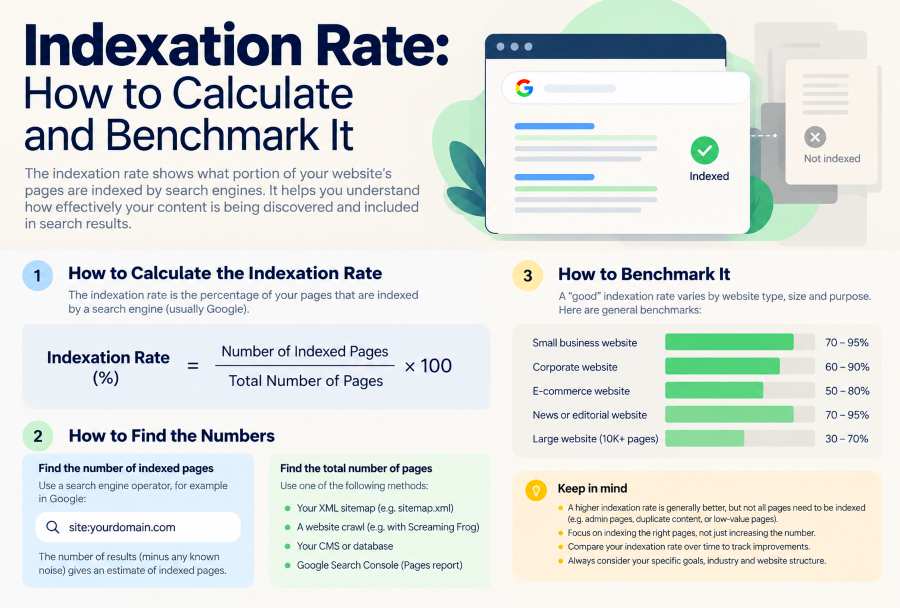
The indexation rate shows what percentage of a group of URLs Google has added to its index. To find it, divide the number of indexed URLs by the total URLs in the group and multiply by 100.
Indexation Rate (%) = (Indexed URLs / Total URLs in Group) × 100
If Google has indexed 850 out of 1,000 URLs, the indexation rate is 85%.
The math is simple. The real challenge is deciding which URLs to count in your total.
Many websites have thousands of URLs that aren’t meant to be indexed—like duplicates, alternate canonicals, or pages you’ve purposely excluded. If you include those, a healthy site can look like it has indexing issues.
For SEO reporting, it’s best to measure the percentage of pages you actually want indexed, and keep track of any pages you’re not sure about. You can also use Google Search Console for a broader rate, but these numbers answer different questions.
This guide walks you through how to gather data, calculate your indexation rate, make sense of the results, and repeat the process with a real-world example.
What Does Indexation Rate Actually Measure?
Indexation rate only measures how much of a specific set of URLs is indexed. It doesn’t say anything about rankings, traffic, or the value of your pages.
This matters because different groups of URLs can give you very different percentages, even for the same site.
Consider three ways to calculate the metric:
Measurement | URL population | What it tells you |
Known-URL indexation rate | URLs Google knows about in a selected Search Console property | How much of Google’s known URL population is indexed |
Submitted-URL indexation rate | URLs represented in a matching submitted-sitemap report | How much of that submitted population is indexed |
Intended-page indexation rate | Unique pages that the website owner wants indexed as canonical | How much of the website’s intended search content is indexed |
These are useful analytical definitions, not three separate Google metrics.
Google Search Console provides Page Indexing data for all known pages, all submitted pages, and individual submitted sitemaps. The report will only count the URLs that are selected by your filter.
An intended page rate requires an extra editorial decision as to which pages actually do get included.
For instance, a site might have 1,000 known URLs, and only 850 of those would be pages which were intended to have an indexed canonical. If 800 of the intended pages were indexed, the intended page rate would be around 94.1%.
That figure tells you something different from a straight 800 divided by 1,000 calculation.
Neither percentage is automatically wrong. The problem begins when the calculation is labeled simply “indexation rate” without explaining its URL population.
Choose the Correct URLs Before Calculating
The most important decision in an indexation audit is the one you make before actually entering any figures into the formula.
You need to decide what constitutes an eligible page.
Start With URLs You Actually Want Indexed
For an intended page audit, the denominator should be pages whose canonical versions you want Google to index.
That's generally going to be the published articles, the key product and category pages, the service pages, and all the other original content that you'd expect to be appearing in Google Search.
It wouldn't automatically include every URL that a site crawler came across.
An ecommerce site, for example, might generate several URLs for one product category:
example.com/shoes/?color=black
If the parameter variations are effectively the same content and have been deliberately grouped into the main category page, then counting all three as separate indexation targets would be an overstatement in terms of the number of pages that would require indexing.
Google's canonicalization documentation makes it clear that it will pick one URL from a group of duplicate or very similar pages.
However, exclusions must be justified.
A product page that by accident has noindex in it is not a valid exclusion simply because Google hasn't indexed it. If the business still wants that product to show in search, it should be in the eligible population, and you should review that situation.
The same goes for an important article which Google has crawled but which it has not indexed.
Don't improve your indexation rate by removing the failed pages from the denominator. That alters the definition of the metric without actually solving the problem.
Classify URLs Before Counting Them
A useful audit separates indexing intention from the actual Google status.
URL situation | Include in intended-page rate? | Reason |
Published original article intended for search | Yes | The page is an indexing target |
Important product page currently not indexed | Yes | The failure should remain visible |
Duplicate filter URL intentionally consolidated | No | A different canonical represents the content |
Retired URL intentionally removed | No | Indexing is no longer expected |
Page with conflicting or missing evidence | Yes, if still an indexing target | The uncertainty must remain visible |
A URL's observed state and its intended role are two separate things. Work out what role it's supposed to have first, then record the evidence.
Handle Canonical Conflicts Carefully
Your preferred canonical URL and Google's selected canonical are not necessarily the same.
Suppose your site says Page A is the canonical page, but Google ends up choosing Page B.
Before you record an indexing failure, check that Page B is an acceptable example of the content you're looking for.
For a URL-specific audit, Page A may still be unindexed. For a content-level audit, the content may be adequately represented by Page B.
The decision has to be documented. Otherwise, you've got two analysts looking at the same site and coming up with different rates for it without either of them knowing why.
You can check Google's chosen canonical via the URL Inspection tool (if you have access to the relevant Search Console property).
How to Calculate Indexation Rate in Google Search Console
Google Search Console is the right place to start if you own or manage the site and want to see Google's first-party indexing data.
Its Page Indexing report gives you the aggregate numbers; URL Inspection is what you use to look at individual pages.
Step 1: Open the Page Indexing Report
Sign in to Google Search Console and select the property (website) that you'd like to look at.
Navigate to:
Indexing → Pages
The Page Indexing report shows you the URLs that have been indexed and those that haven't. It also gives you a breakdown of why certain pages may not be indexed.
Before you go and record the figures, make sure you know which population the report is about.
Step 2: Select the URL Population
Use the sitemap filter above the Page Indexing chart.
Google documents these filter choices:
All known pages: URLs that Google knows about in the property.
All the pages that were submitted: URLs as represented in the submitted sitemaps.
Unsubmitted pages only: URLs not present in the sitemaps that were submitted.
Specific sitemap URL: URLs as represented in the selected submitted sitemap.
For a sitemap-based measurement, pick the relevant submitted sitemap.
For broad property coverage, use All known pages (remember that's Google's known population, not necessarily your entire site).
If no new important pages have yet been found, then they may simply be missing from Google's count. That's one reason an owner-managed inventory is still useful.
Step 3: Record the Indexed and Not-Indexed Totals
Read both counts from the same selected filter.
For example, suppose the report shows:
Report value | Count |
Indexed | 2,400 |
Not indexed | 600 |
Total represented URLs | 3,000 |
The calculation is:
(2,400 ÷ 3,000) × 100 = 80%
Label the result according to the filter used (e.g. "All submitted pages indexation rate: 80%").
Don't take the site-wide indexed count and divide it by the URL total from one sitemap. The numerator and denominator would be different populations.
Record the date of the report observation and the property you've selected. The Search Console data will reflect previous crawls and processing, so the information you see isn't necessarily a live snapshot of every page as you're looking at the report.
Step 4: Investigate the Reasons Behind the Percentage
An 80% rate doesn't mean that 20% of your intended pages have indexing issues.
Open the Why pages (the ones that aren't indexed categories).
You might come across intentional exclusions such as duplicate URLs, redirects, and correctly applied noindex instructions. You might also come across pages that Google has discovered or crawled but which have not been indexed.
Google's Page Indexing documentation is very clear in its advice to site owners to differentiate between legitimate exclusions and pages which should in fact be indexed.
There's another reporting limitation in that the example URLs in the Page Indexing details are limited to 1,000 per status or issue, and Google notes that the examples may be incomplete even below that 1,000 URL cap.
The summary counts are of use for aggregated reporting. The example URL exports should not be taken as being a complete inventory of all the URLs that were affected.
Step 5: Verify Important URLs Individually
For an important page whose status seems a bit unexpected, use URL Inspection.
It can provide Google's recorded indexing status, crawl info, indexing permissions, and the selected canonical URL.
A live URL test will tell you whether the page is currently indexable, but it won't prove that Google has in fact indexed the current version.
If you're doing an audit of thousands of URLs, then start with patterns and representative cases. A full URL-level audit will require an appropriate collection methodology, property access as appropriate, and a record of which results are still in doubt.
Our guide on Google Index Checker vs Google Search Console makes it very clear that public bulk checks and first-party URL Inspection should not be regarded as equivalent evidence.
Worked Example: An Indexation Audit of 1,200 URLs
A reproducible audit should account for every URL in its starting inventory.
Imagine a hypothetical website with 1,200 URLs pulled from its CMS and crawl inventory.
Having looked at the indexing intention and canonical relationships, the owner has identified 300 URLs that are deliberately excluded from the target set.
That leaves 900 URLs which were intended to have indexed canonical versions.
For this illustration, we're assuming the eligible URLs have been classified using appropriate property-authorized indexing evidence (with the sole exception of where the evidence is explicitly unresolved).
The audit produces the following counts:
Audit classification | URL count |
Total URL inventory | 1,200 |
Intentionally excluded | 300 |
Eligible for intended-page audit | 900 |
Confirmed indexed | 810 |
Confirmed not indexed | 50 |
Unresolved | 40 |
These are illustrative figures - not actual figures taken from a real site, nor are they a claim of having done any Google testing.
First, Reconcile the Inventory
Before you work out a percentage, make sure that every URL falls into one classification.
The complete inventory reconciles:
300 intentionally excluded + 900 eligible = 1,200 total URLs
The eligible inventory also reconciles:
810 indexed + 50 not indexed + 40 unresolved = 900 eligible URLs
This check ensures that URLs don't disappear between the original inventory and the reported metric.
It also highlights errors such as duplicate records and unexplained exclusions.
Calculate the Confirmed Indexed Share
There are 810 confirmed indexed URLs out of the 900 eligible URLs.
(810 ÷ 900) × 100 = 90%
The confirmed indexed share is therefore 90%.
Note the wording. 40 of the eligible URLs have unresolved status, so the audit cannot establish that the final rate is precisely 90%.
Under the stated evidence assumptions, 90% of the eligible population has been confirmed indexed.
What happens if you use the entire inventory?
Dividing the same 810 confirmed indexed eligible URLs by all 1,200 inventoried URLs produces:
(810 ÷ 1,200) × 100 = 67.5%
This is the proportion of the full owner-managed inventory that has been confirmed indexed within the eligible group.
It's not the site's overall Google indexation rate. In this example, the URLs that were excluded were not actually audited for their Google status at all.
The result shows why you must name the denominator before interpreting the number.
Account for the 40 Unresolved URLs
The outstanding records represent around 4.4% of the eligible population.
If every unresolved URL were ultimately confirmed indexed, the eligible-page rate would be:
(810 + 40) ÷ 900 × 100 = 94.4%
Under the illustrative assumptions, the currently supported range is therefore 90% to c.94.4%.
That's a mathematical bound derived from the classification, not a prediction or a statistical confidence interval.
The actual outcome remains unknown until those records are reviewed.
I would report the finding as:
Of the 900 URLs that were intended to be in the index, 810 were confirmed to be indexed (90.0%), 50 were confirmed not to be indexed (5.6%), and 40 were unresolved (4.4%). The final figure will be based on the verification of those 40 unresolved URLs.
This is a lot more informative than just saying "90% indexed" without any qualification.
How to Reproduce the Audit
The example could be recreated in a spreadsheet with a row for each URL.
Each record must contain the URL, page group, indexing intention, reason for exclusion (where applicable), observed index status, evidence source, and observation date.
Use these calculations:
Metric | Calculation |
Eligible URLs | Total inventory − justified exclusions |
Confirmed indexed share | Confirmed indexed eligible URLs ÷ eligible URLs × 100 |
Confirmed non-indexed share | Confirmed non-indexed eligible URLs ÷ eligible URLs × 100 |
Unresolved share | Unresolved eligible URLs ÷ eligible URLs × 100 |
Upper bound if all unknowns are indexed | (Confirmed indexed + unresolved) ÷ eligible URLs × 100 |
Keep the classifications separate. Don't take an inconclusive public search result and convert it into a "not indexed" result.
A public site: query is useful for investigation, but as Google's documentation on the operator makes clear, it doesn't necessarily return every indexed URL.
For a credible report, the evidence source is as important as the formula.
What is a good indexation rate?
There's no magic percentage that makes every site's indexation healthy.
Some indexation calculators will refer to 80%, 90% or 95% as being the "healthy" levels. Those may be useful benchmarks to have, but they're not Google's universal requirements.
Google says site owners should focus on getting the canonical versions of their important pages indexed rather than expecting 100% of all the URLs out there to be indexed.
An ecommerce site with a lot of filtering URLs can have a fairly low raw known URL rate and yet have all the important product and category pages properly indexed.
A small company site can have a very high aggregate rate and yet have one of their essential service pages completely unindexed.
You can't judge either situation responsibly based on the percentage alone.
Benchmark Against Your Own Eligible Pages
A more defensible approach would be to look at consistent groups over time.
For instance, separate your old blog posts from your new ones. A group of posts published yesterday shouldn't be judged against the same yardstick as content that's been up for months.
You can also segment on products, categories, landing pages, or other key templates.
The value of segmentation becomes clear: suppose an e-commerce site has 10,000 eligible pages and an overall confirmed indexation rate of 90%.
That looks pretty high on its own.
But if the other 1,000 pages are all concentrated in a single newly launched product category, then the total figure masks a potentially significant technical or commercial issue.
The next question should be which pages are missing rather than whether 90% is acceptable in all cases.
A Falling Rate Does Not Always Mean Google Deindexed Pages
Consider another hypothetical website measured at two points:
Metric | Week 1 | Week 2 |
Eligible URLs | 1,000 | 1,200 |
Confirmed indexed URLs | 850 | 960 |
Confirmed indexed share | 85% | 80% |
The site has 110 confirmed indexed URLs.
Its indexation rate dropped from 85% to 80%.
The reason is, of course, mathematical: the eligible population grew faster than the indexed number.
We can't say Google removed the pages from the index without looking at the other 200 URLs.
They may be new content that has just been published and hasn't yet been indexed.
The other way around is also possible. A site can increase its percentage by removing eligible URLs from its inventory even if Google has indexed no further pages.
For that reason, an agency report should show both the % and the underlying counts along with the changes in the population definition.
When an Indexation Rate Needs Investigation
Once the population is defined and the counts are brought up to date, use that result to identify the specific problems.
Start with the important eligible pages that have been confirmed as not indexed.
A missing product category with commercial search demand is probably more worth our attention than a low-value URL which we've deliberately excluded.
Next, group the non-indexed URLs by template, by directory, by publishing period, or by indexing reason.
Suppose 35 of the 50 confirmed non-indexed pages are using the same product template. That level of concentration would point to looking at the common technical elements before you go around treating each of those 35 pages as a separate issue.
Canonical directives, accidental noindex settings, server responses, and internal linking are all things we could look at. Which of those is the issue will be determined by the evidence we see.
If the issue is just with the newly published content, then compare its indexing history against that of the older, more established pages before you go and conclude that the whole site has an indexing problem.
For more detailed URL status investigation, our guide goes into how to check indexed pages in bulk.
Checking Large URL Inventories
Individual URL inspection is good for diagnosing the key pages; it becomes much more of a challenge when you've got an agency managing thousands of URLs across several properties.
BulkIndexCheckr provides bulk index status checking via URL lists and CSV/TXT imports. They advertise the ability to check batches of up to 50,000 URLs.
That can help teams group large numbers of URLs and flag pages that may be worth further investigation.
A public index status result should not be taken as being the same as Google's private Search Console index status for a verified property.
Use bulk checks for scalable investigation and for authorized Search Console evidence where you need a definitive diagnosis. The tool doesn't tell you which pages your site actually intended to index (that's still part of the audit).
How to Report Indexation Rate to an SEO Client
A useful indexation report should show enough information for another analyst to understand and reproduce the calculation.
At minimum, record the property, observation date, URL population, eligibility rules, confirmed indexed count, confirmed non-indexed count, unresolved count, and evidence source.
If the calculation uses Google Search Console’s aggregate Page Indexing totals, label the selected report filter.
If it uses a curated inventory, identify how URLs were collected and how exclusions were classified.
Do not present these different methods as directly comparable without reconciliation.
For ongoing reporting, retain the previous period’s underlying counts and classification rules. Otherwise, a percentage change may reflect a changed inventory rather than changed Google indexing behavior.
The practical reporting rule is simple:
Never present an indexation percentage without its denominator, evidence source, and unresolved share.
Those details turn a basic SEO metric into something a website owner can assess, question, and act upon.