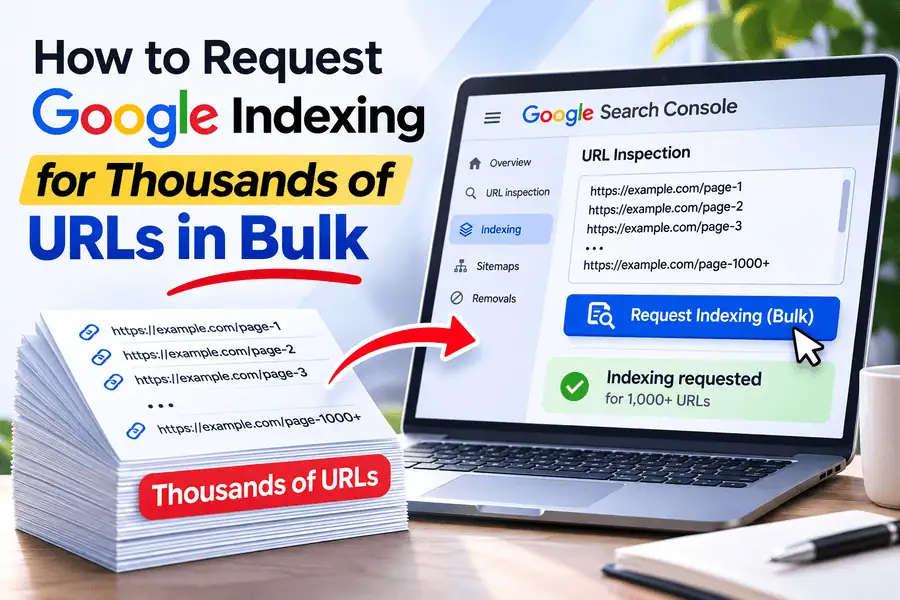
If you want Google to index thousands of URLs at once, start by deciding which URLs you want indexed. Then, choose the best way to submit them and keep track of the results. You can request indexing for individual pages in Google Search Console, but using an XML sitemap is usually better for helping Google find lots of regular webpages.
The challenge comes when you have hundreds or thousands of URLs. Submitting each one by hand in Google Search Console means repeating the same steps over and over. You also need to figure out which pages are really missing from Google’s index and which ones are supposed to be left out.
A bulk index checking and request management process can make this easier. You can review many URLs at once, find the ones that aren’t indexed, choose which ones to act on, handle the requests, and then keep an eye on their indexing status.
TL;DR:
Add URLs to a Project: Organize thousands of URLs in one place.
Check Indexing Status: Identify which URLs are indexed and which are not.
Investigate Not Indexed Pages: Review indexing issues and identify possible causes.
Select Important URLs: Prioritize valid, high-value pages for submission.
Use XML Sitemaps: Help Google discover URLs at scale.
Request Indexing via Search Console: Submit individual URLs for indexing consideration.
Use Google's Indexing API: Only for qualifying job-posting and livestream pages.
Manage Bulk Indexing: Use a bulk management tool to organize and track the process.
Monitor Indexing Progress: Recheck URLs regularly, as submission does not guarantee Google indexing.
Can You Request Google Indexing for Multiple URLs at Once?
Yes, but each method works in its own way.
Google Search Console does not let you select thousands of regular URLs and submit them all for indexing at once. The URL Inspection tool only processes requests one by one, and there are limits on how many you can submit.
If you have many standard webpages, Google suggests submitting an XML sitemap. A sitemap can include thousands of URLs and helps Google find or revisit those pages.
Google also offers an Indexing API, but it is officially only supported for pages with JobPosting structured data or BroadcastEvent inside a VideoObject.
These approaches are not the same and should not be treated as equal.
Submission method | Suitable for | Main limitation |
|---|---|---|
Google Search Console URL Inspection | A few important new or updated URLs | Individual requests and quotas |
XML sitemap | Hundreds or thousands of ordinary webpages | Discovery does not guarantee indexing |
Google Indexing API | Eligible job-posting and livestream pages | Restricted page types and API quotas |
Bulk indexing management tool | Checking, selecting, managing, and monitoring many URLs | Actual submissions remain subject to Google's supported methods |
Google's official recrawling documentation recommends URL Inspection for a small number of pages and sitemaps for large URL collections.
Just because a tool lets you add 10,000 URLs to a project, it doesn’t mean it will make 10,000 individual indexing requests supported by Google. Things like project capacity, request eligibility, API quotas, and actual indexing are all separate factors.
For an SEO team, it’s more helpful to figure out which URLs need attention and then manage those tasks.
Which URLs Should You Request Google Indexing For?
Not every URL that's been marked as Not Indexed should get an indexing request.
A site can have duplicate URLs, redirects, deleted pages, canonicals and pages which have been explicitly excluded via noindex. Google may well be correct in not indexing those URLs.
Before you submit anything at all, separate your URLs into three broad categories.
Newly Published URLs
New articles, product pages, service pages and landing pages won't necessarily show up in Google's index straight away upon publication.
Google first has to find the URL, then crawl the page, process the content and then decide whether to index it.
For newly published pages make sure the URL is live, it's in the correct XML sitemap and it's linked from the right places on your site.
If only a handful of key pages need attention then the individual Request Indexing feature in Search Console may be the right one to use.
Updated URLs That Need Recrawling
A page can already be indexed by Google even whilst Google still has the information from the earlier version.
For instance you may have re-written an article, updated product information, amended the structured data or sorted out a technical issue.
These changes could be sufficient grounds for making the new version more discoverable by Google. An accurate <lastmod> date in your sitemap will help to signal that you've made significant updates. For a small number of key pages you could also consider asking for a recrawl via Search Console.
An important point of clarification is that updated URLs do not need to become 'Not Indexed' in order for Google to be able to recrawl them.
A workflow which picks out only unindexed URLs will not automatically find every important page that's been updated.
Unindexed URLs That Should Appear in Search
These are often the primary candidates for further investigation.
A page may be missing from Google's index because it was never discovered, has not yet been crawled, contains an indexing restriction, or was crawled without being selected for indexing.
Some of these conditions can be corrected. Others require a decision about whether the URL deserves its own index entry.
Before requesting indexing, verify the exact reason for exclusion whenever possible.
For a detailed explanation of the different causes, see Why Isn't My Page Indexed by Google? 9 Causes and Fixes.
How to Manage Google Indexing for Thousands of URLs in Bulk
The following workflow includes bulk URL checks, eligibility review, supported submission methods, and monitoring.
It applies regardless of how many URLs you're managing (100, 10,000 or up to 50,000 in a project).
Step 1: Create a Project and Add Your URLs
Start off by gathering the URLs you want to monitor.
Your inventory could be sourced from your website's XML sitemap, a CMS export, a CSV file or an existing SEO report.
For a big site, you can group your URLs by section or by purpose. An SEO agency might well have one project per client.
Open your dashboard, create (or select) a project, and then add the relevant URLs via one of the import options.
Before importing, clean the list:
Remove duplicate entries.
Keep complete URLs (including https://).
Identify preferred canonical URLs.
Don't include any irrelevant test or staging URLs.
Keep the different website properties well separated.
Preserve information about pages that have just been updated.
For instance, imagine you have a website with 10,000 URLs across the board (products, articles, categories, and so on).
Rather than re-copying those URLs into Search Console time and again, keep the inventory within a project and reuse it for your subsequent checks.
Expected result: A project containing the URLs you want to look at, with the URL inventory ready for the initial indexing check.
Step 2: Run a Bulk Google Index Check
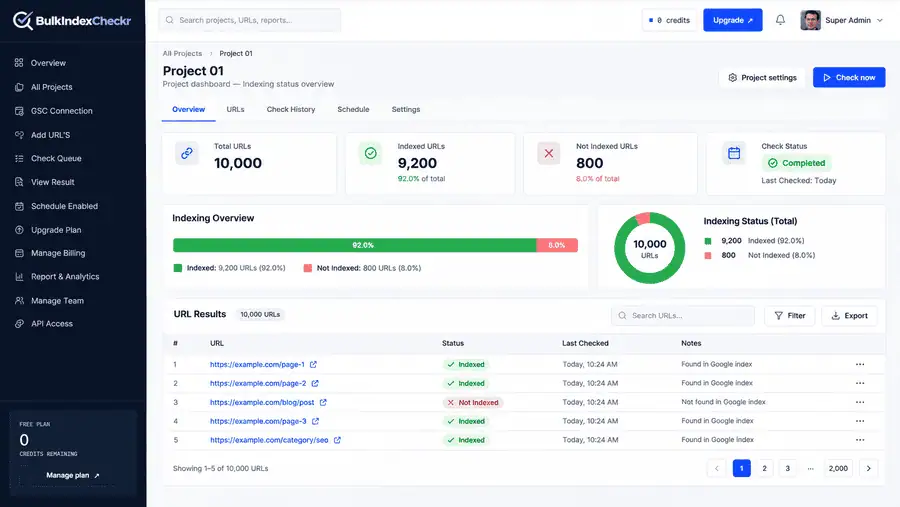
Before requesting indexing, determine which URLs are already indexed.
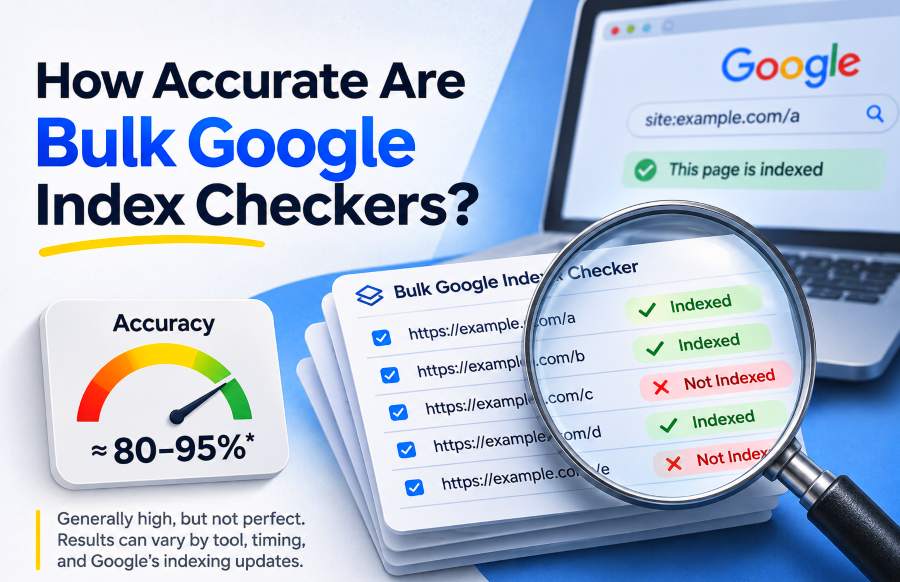
BulkIndexCheckr's published workflow supports bulk index checks, returning Indexed or Not Indexed results for URLs within a project.
Run the check and review the reported totals.
Consider this hypothetical result:
Indexing status | Number of URLs |
|---|---|
Indexed | 9,200 |
Not Indexed | 800 |
Total checked | 10,000 |
Instead of manually inspecting 10,000 URLs, you now have 800 results requiring further evaluation.
However, the Not Indexed status does not explain why each URL is missing.
For an important page, use Google's URL Inspection tool to investigate details such as crawl status, indexing restrictions, and the Google-selected canonical.
Also note when the check was performed. Index status can change between checks, so an older result should not be treated as a permanent statement about a URL.
Expected result: An initial indexed/unindexed inventory with a check date and a smaller group of pages requiring investigation.
Step 3: Filter the Not Indexed URLs
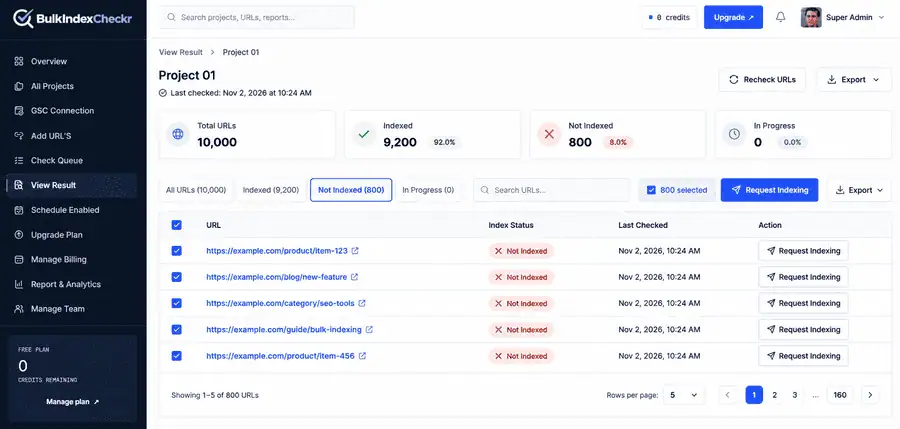
Open the project results and filter for URLs marked Not Indexed.
BulkIndexCheckr's published project workflow describes individual URL selection, row checkboxes, and project-level selection of unindexed URLs.
The product is designed to let you identify and select these pages without manually building a new list for every request.
A project-level action can identify the unindexed subset of the URL inventory and display the number selected. Individual row actions are useful when only one URL needs attention, while checkboxes allow a smaller group to be selected.
Do not submit every filtered URL automatically.
The next step is to determine which of those pages should actually appear in Google Search.
Step 4: Qualify the URLs Before Submitting Requests
For each important unindexed URL, check whether it is suitable for indexing.
A useful qualification process examines four conditions.
1. The page is intended to appear in Google Search. Exclude deliberately private, duplicate, or non-search pages.
2. Googlebot can access the page. Check for relevant server errors, crawl restrictions, and authentication problems.
3. The page permits indexing. An unintended noindex directive can prevent inclusion even when the page loads normally.
4. The canonical and content are appropriate. Confirm that the page represents the preferred URL and provides meaningful content rather than duplicating another page.
For pages that fail these checks, investigate and repair the underlying problem before making a request.
Google's Page indexing report and URL Inspection tool can provide useful information about exclusions, including Discovered – currently not indexed, Crawled – currently not indexed, duplicate URLs, and canonical alternatives.
A page may also be technically indexable but still not be selected by Google. An indexing request cannot override Google's independent assessment of whether the content belongs in the index.
A Practical Example: Which of 10,000 URLs Actually Need Indexing Requests?
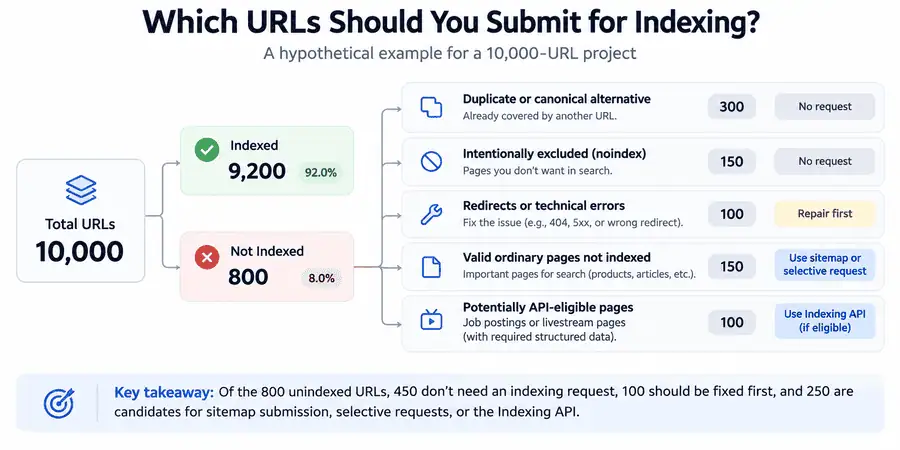
Consider an illustrative large website containing products, articles, and qualifying job listings.
Its initial check reports 10,000 URLs, of which 800 are not indexed.
The next step is to classify those 800 URLs rather than submitting all of them.
URL condition | Number of URLs | Recommended action |
|---|---|---|
Duplicate or alternate canonical | 300 | Usually no request |
Intentionally excluded by | 150 | Keep excluded |
Redirects or technical errors | 100 | Investigate and repair |
Valid ordinary pages not indexed | 150 | Sitemap discovery or selective individual requests |
Potentially Indexing API-eligible pages | 100 | Verify eligibility and applicable API requirements |
Total Not Indexed | 800 |
The example identifies 450 URLs for which there's no immediate need to issue an indexing request and another 100 that require some technical investigation first.
That leaves 250 URLs that would require discovery or notification under the stated assumptions. Of those, only 100 are potentially eligible for the Indexing API method as documented by Google.
The 250 URLs aren't all in the same submission queue.
For the 150 normal pages, XML sitemaps and targeted individual Search Console requests are the right approach.
For the 100 qualifying job or livestream pages, you can use the Indexing API provided their structured data, ownership, authentication, and other requirements are met.
Why the distinction matters
Suppose the 100 potentially API-eligible pages are in fact just standard product pages.
The number of unindexed URLs is still at 800, though none of those 100 pages are now on the documented Google Indexing API route.
The valid ordinary page group goes from 150 to 250.
Indexing status unchanged. Supported submission method has changed.
This example shows why picking URLs simply because they are marked 'Not Indexed' is not good enough.
How this example was calculated
The example uses a hypothetical inventory of 10,000 different URLs.
Of those 10,000, 9,200 are initially classified as indexed and 800 as unindexed. The 800 unindexed are split into five non-overlapping groups by exclusion reason, technical condition, and content type.
We checked the counts and totals, with the only change being the assumption around API eligibility.
This is a decision-making example, not a live Google indexing experiment or a measurement of BulkIndexCheckr's submission performance.
The same classification can be applied to a real project once we have the URL information.
Step 5: Submit URLs Using the Correct Indexing Method
After qualifying the URLs, decide on how they should be submitted.
The right approach is going to be different depending on whether you're dealing with standard webpages or pages that meet Google's specific Indexing API requirements.
Option 1: Submit Ordinary URLs Through an XML Sitemap
An XML sitemap is the standard way of providing Google with a large number of normal URLs.
For instance, if your site is publishing 2,000 new product pages, you can add the preferred canonical URLs to your XML sitemap and make the updated sitemap available to Google.
To submit a sitemap through Google Search Console:
Open the verified website property.
Navigate to Sitemaps.
Enter your sitemap URL, e.g., https://example.com/sitemap.xml
Click Submit.
Just check the sitemap processing status.
Resolve any reported access/format errors.
A sitemap should contain the URLs you'd like Google to discover and consider for indexing.
Include full absolute URLs, ensure accurate canonical references are used, and update the <lastmod> tag where there have been significant page changes. Per Google's sitemap guidelines, an individual sitemap can contain up to 50,000 URLs or 50MB uncompressed.
Larger collections can be split across separate sitemap files and included in a sitemap index.
Google can find the URLs via the sitemap that you've submitted, but it's still up to Google as to when it will crawl them and whether or not it will index them.
Option 2: Request Indexing for Individual URLs in Search Console
For a small number of important pages, use Google Search Console directly.
Open the URL Inspection tool, enter the complete URL, and review the result.
If you recently corrected a technical issue, use the live URL test where appropriate to confirm that Google can now access the corrected version.
When the page is suitable for indexing and the Request Indexing action is available, submit the request.
The basic process is:
Open Search Console.
Select the verified property.
Enter the URL in the inspection field.
Review its indexing status.
Check the live version where necessary.
Click Request Indexing.
Monitor its status afterward.
Google requires suitable property permissions and applies quotas to individual requests.
Submitting the same unchanged URL repeatedly does not make Google crawl it faster.
This method remains useful for a few priority pages, but it is not an efficient manual workflow for thousands of URLs.
You can read the individual procedure in How to Submit a URL for Indexing to Google.
Option 3: Use the Google Indexing API for Eligible Pages
Google's Indexing API provides a programmatic notification method for supported page types.
Its documented use is limited to qualifying job postings and livestream pages.
An eligible website can notify Google when a supported URL is added, updated, or removed.
The API also supports batches of up to 100 notification requests in a single HTTP call. Each URL still counts toward the applicable request quota.
There are several requirements:
The page must satisfy Google's supported content-type conditions.
The application must use the appropriate authorization.
Website ownership must be verified as required.
Requests must remain within Google's published usage restrictions.
Submission results must be monitored separately from indexing results.
Google's Indexing API documentation explains the supported operations and request structure.
An accepted API notification confirms receipt of the notification, not that the URL has been indexed.
The Indexing API should not be described as an officially supported general-purpose submission method for ordinary articles, ecommerce product pages, and landing pages.
Step 6: Manage Bulk Indexing Requests Through a Project Dashboard
For SEO teams, the administrative work continues after the URL list has been qualified.
You may need to process multiple groups of URLs, track submissions, handle errors, and report the outcome to a client.
BulkIndexCheckr's Bulk Indexing Request feature is built around this project-based process.
Its described workflow connects index-check results with URL selection and submission records.
Request Indexing for One URL
When a particular URL is marked Not Indexed, the project interface is designed to provide a row-level indexing-request action.
This is useful when you need to handle a single important page rather than selecting an entire group.
Before using the action, confirm the URL is appropriate for the underlying submission method.
A row-level action does not change Google's eligibility requirements.
Select Multiple Unindexed URLs
For a smaller batch, use the selection checkboxes beside the relevant URL rows.
This lets you choose particular pages rather than submitting every URL with the same status.
For example, a project may have 600 unindexed pages, but only 40 are important new pages requiring immediate investigation.
You can prioritize those 40, verify their eligibility, and manage the appropriate actions for that selected group.
This approach is more selective than treating every unindexed URL as equally important.
Use the Project-Level Request Action
For a larger inventory, the project-level Request Google Indexing action is designed to identify and count URLs currently marked Not Indexed.
The resulting list can then be reviewed before any submission action.
This avoids manually selecting every row just to establish which URLs are in the unindexed group.
However, identifying all unindexed URLs and identifying all eligible indexing-request URLs are different operations.
The project filter provides the starting list. Eligibility checks determine which items should proceed.
The exact Google submission method used by a third-party request feature must be verified separately. Its ability to queue requests does not expand the Indexing API's officially supported scope.
Step 7: Understand the Indexing Request Queue
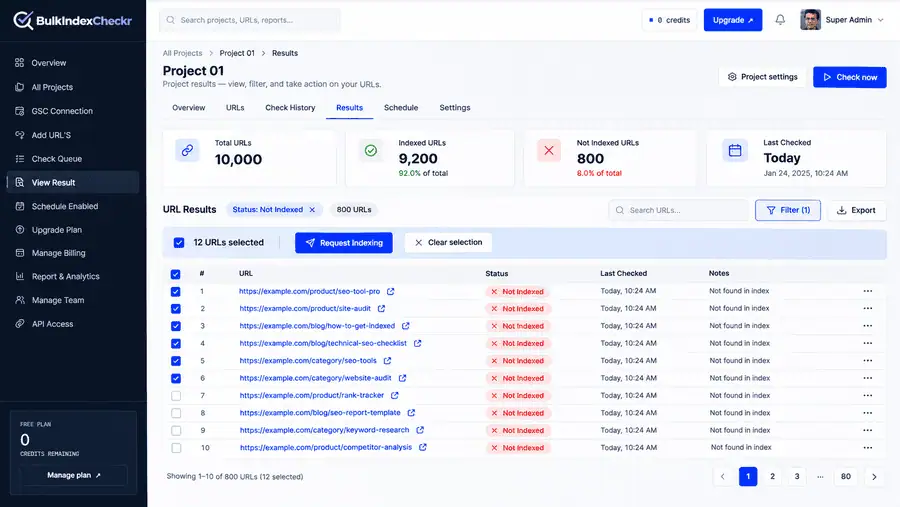
Submitting many individual processing tasks synchronously can make a bulk workflow difficult to manage.
A queue allows an application to accept a group of tasks and process them in the background.
For example, an SEO manager might select a set of qualifying URLs and initiate the supported request operation. The application can then process the tasks according to its configured limits and record the result of each action.
The important states are conceptually different:
Queued: The application has recorded the task and is waiting to process it.
Processing: The task is being handled.
Completed: The application finished its processing operation.
Failed: The task encountered an error or could not complete successfully.
Google acknowledged: Google received a supported notification, where an acknowledgment is available.
Indexed: A subsequent indexing check found the URL in Google's index.
These are reporting concepts rather than a claim about the exact labels used by a particular dashboard.
What Does a Completion Notification Mean?
A completion notification should tell you that the relevant application task or batch has finished processing.
It should not be interpreted as confirmation that Google indexed every URL.
The difference matters when you report progress to a client.
A project can have completed submission tasks while some or all of the URLs remain unindexed.
Where completion notifications are provided, use them to determine when to review the submission records. Then continue with independent indexing verification.
Step 8: Monitor Which URLs Google Actually Indexed
A completed submission is not the final measurement.
You need to determine which pages entered Google's index after the relevant actions.
Start by preserving the initial status and check date for the URLs you are monitoring.
After allowing Google time to process changes, check their status again.
For selected important pages, use Search Console's URL Inspection tool.
For a larger inventory, a bulk index checker can make repeated status checks more manageable.
BulkIndexCheckr also offers scheduled index monitoring, with published options for recurring project checks.
Scheduled index checks and indexing-request submissions are separate operations. Monitoring does not automatically submit another request.
What Should Your Indexing Report Contain?
A useful report should distinguish the actions performed from the outcomes observed.
For each URL, record the original indexing status, check date, action taken, application processing result, follow-up check date, and latest observed indexing status.
For example, consider a URL that was initially Not Indexed.
Your report might show that the page was repaired, added to a sitemap, and later observed as Indexed.
That is a useful sequence of recorded events. It does not prove the sitemap submission alone caused the indexing change, because Google may have discovered the page through other crawl paths.
The same caution applies to timing.
A check performed on Friday may be the first time your system detected the page as indexed, but Google might have indexed it earlier.
For more detail about timestamps, see How to Check When a Page Was Indexed by Google.
How many URLs can you manage? 100? 1,000? 10,000? 50,000?
The principles stay the same as your inventory grows; only the amount of admin changes.
With 100 URLs, an SEO exec could potentially go through the most important pages one at a time.
With 1,000 URLs, the benefit of filtering and grouping becomes much more apparent, as your inventory is likely to contain multiple exclusion reasons.
10,000 URLs and it's starting to be important to have a proper project structure, scheduled checks and a record of what we've done previously.
50,000 URLs is a lot. A clean URL list and clear selection criteria are key to avoiding unnecessary processing, duplicate submissions, and misleading reports.
There's no rule that a bigger inventory will result in more indexing requests.
A 50k URL site might only have a handful of pages that are actually worth looking at. Conversely, a smaller site could have a serious indexing issue affecting most of its content.
The number of URLs that need action is going to be a function of their actual condition rather than the total number in the inventory.
Project Capacity Is Not Google Submission Quota
Keep these limits separate:
Project or checking capacity: How many URLs your tool can store or check.
Sitemap capacity: up to 50,000 URLs or 50MB uncompressed per sitemap.
Search Console quota: Google's limits on individual indexing requests.
Indexing API eligibility and quota: what content types are eligible to use the API and how many notifications can be sent.
Tool credits: what the application charges you for index checks and request processing.
A project with 50,000 URLs doesn't mean that Google has accepted 50,000 individual indexing notifications for those URLs.
How much does bulk URL index checking and requesting cost?
When you're planning a big indexing job, it's important to separate the cost of checking from the cost of request processing.
Under the supplied BulkIndexCheckr credit model:
One URL checked is 1 credit.
One indexing request costs 2 credits to process.
Consider the earlier hypothetical project with 10,000 URLs.
Checking the full inventory at one credit per URL would cost 10k credits.
Suppose 100 URLs are eligible for a supported request method and are processed at two credits each.
Those requests would use another 200 credits.
The total would be:
10,000 checking credits + 200 request credits = 10,200 credits.
This is an illustrative usage calculation based on the stated credit rates. It is not a verified current checkout quote, nor is it Google's actual indexing quota.
Further checks or request attempts may use up more credits in accordance with the product's relevant billing rules.
The key planning principle is to work out the checking volume and the eligible request volume separately.
You shouldn't assume that all of the 800 URLs that are marked 'Not Indexed' in the example above will all require a paid request submission.
Why Google May Not Index URLs After Submission
Indexing requests don't fix the problems with the page itself.
If a URL you've submitted remains unindexed by Google, then look at what Google knows about that page rather than just resubmitting it.
Discovered – Currently Not Indexed
Google is aware that the URL exists but has not yet crawled it.
Have a look at its sitemap inclusion, internal linking, crawlability and the wider site pattern.
If you've got thousands of related pages all exhibiting this behavior, then it's time to look at the site structure rather than going round asking each one in turn.
Crawled – Currently Not Indexed
Google has crawled the URL but hasn't indexed it.
The next one should look at whether the content is useful and different, whether it's just a duplicate of another page, and whether there are any rendering or canonicalization issues.
Another request for the same page doesn't fix those conditions.
Duplicate or Google-Selected Canonical
Google may treat your page as a duplicate of another URL and therefore pick a different canonical.
Check both the user-declared canonical and the Google-selected canonical in Search Console.
If the selected canonical is correct, the exclusion is likely the cause. If it's wrong, look at the signals influencing Google's decision.
Technical Restrictions
A page might contain an accidental noindex instruction, might return a server error, might be coded to block Googlebot, or might simply fail to render the content that's supposed to be there.
Resolve the technical issue first.
After the fix, check the live page and then pick an appropriate recrawling or discovery method.
The full troubleshooting process is outlined in Why doesn't Google index My Page?
How long does Google take to index URLs after a request?
Google won't guarantee you'll be indexed at any particular time.
Its documentation states that crawling could take anywhere from a few days to a few weeks. Some pages may never actually be added to the index.
The timeline will vary depending on several factors, including discovery, crawling, the page's technical state, and Google's indexing decisions.
A bulk request queue can finish its own work before Google has even come back to the pages.
That is why three different events should be measured separately:
Submission complete: the app has finished with the request.
Google crawling: Googlebot crawled the page (visited it or came back to it).
Indexing: Google's systems went through the content and indexed it.
You can't use a completed queue timestamp to work out exactly when Google indexed it.
After you've submitted it, just keep an eye on the status of the URL and go in to investigate any persistent issues rather than just asking for the same page over and over again.
Common Mistakes When Requesting Google Indexing in Bulk
Several mistakes can turn a massive URL list into a huge amount of pointless submission work.
Submitting every Not Indexed URL: some of the exclusions are intentional/correct. Always check the reason before selecting a page.
Ignore the sitemap. For normal webpages at scale, you're better off with a clean XML sitemap rather than just going through individual requests.
Using the Indexing API for unsupported page types: the documented API has specific eligibility criteria and batch support in no way circumvents them.
Repeating the requests doesn't speed up the crawling of the same URL. That's Google's position.
Treating a completed queue as a successful index: a processing result and a Google index status result are two different metrics.Ignoring already-indexed updated pages: An updated page can require recrawling attention without ever appearing in the Not Indexed group.
Confusing a tool's URL limit with Google's quota (storage capacity, checking capacity, and submission eligibility are all separate). Avoiding these mistakes makes a bulk workflow more accurate, regardless of which tool you use.
Frequently Asked Questions
Can I submit 10,000 URLs to Google all at once?
You can include 10,000 ordinary URLs in an XML sitemap and submit the sitemap through Google Search Console. This helps Google discover the listed pages but does not create 10,000 individual indexing requests or guarantee their inclusion in the index.
Can I have indexing of all unindexed URLs automatically?
You can automate checking, selection, monitoring, and supported submission operations. However, not every unindexed URL needs a request, and Google's APIs have eligibility and quota restrictions. Inspect and qualify the URL list before initiating requests.
Does Google Search Console have a bulk request indexing button?
Search Console's URL Inspection interface is the interface that deals with individual indexing requests. For most ordinary URLs, Google will recommend the use of an XML sitemap. The URL Inspection API gives you index status information; it is not a general bulk Request Indexing endpoint.
Can I reindex a page that's already been indexed?
Yes, a page may need to be recrawled following a major change even if it's still indexed. It's important to keep the last modified date in your sitemap accurate and to use individual Search Console requests judiciously where appropriate.
Does Google guarantee that it will index following a successful request?
No. A successful request or API ack does not mean that the page will be crawled, indexed, ranked, or that there will be any particular time to completion. Google will make its own decision as to whether or not to include the page in its index.
Can I use BulkIndexCheckr to monitor the URLs that I've submitted?
BulkIndexCheckr provides project-based index checking and advertises scheduled monitoring. Its bulk request product also describes URL selection and submission history. Confirm the supported submission method and applicable page-type restrictions before using indexing-request actions.
The Right Way to Manage Thousands of Google Indexing Requests
If you manage hundreds or thousands of URLs, start with an accurate inventory rather than a large submission queue.
Check the URLs, identify pages missing from Google's index, investigate exclusion reasons, and separate legitimate exclusions from pages that need repairs or discovery.
For ordinary webpages, maintain XML sitemaps and use Search Console's individual Request Indexing action selectively. For qualifying job-posting and livestream pages, Google's Indexing API provides an additional supported notification method.
A project-based workflow such as BulkIndexCheckr can help organize URL selection, request records, and subsequent monitoring, subject to the submission method's eligibility and quota restrictions.
The objective is not to submit the greatest possible number of URLs. It is to take the appropriate action for each important page and keep a reliable record of whether its indexing status changes.