Indexing Checker vs. Indexation Checker: Is There a Difference?
Ethan Parker
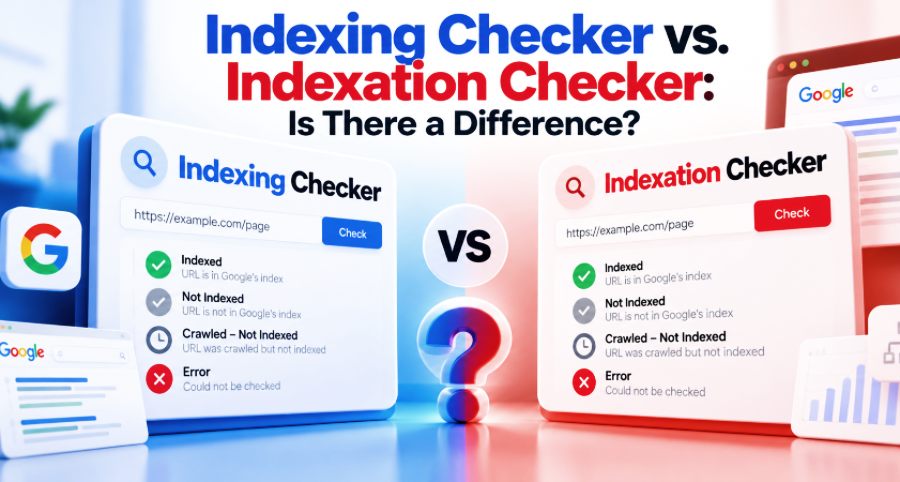
An 'indexing checker' and an 'indexation checker' are pretty much the same thing. They're both tools that will tell you whether or not a URL is in Google's search index. I wouldn't choose one over the other based on the name alone, since it says nothing about how the tool works or how good its results are.
The key distinction is between checking the index status and checking whether a page can be indexed. Those are two different things, and mixing them up can lead to the wrong diagnosis.
Does Google use indexing or indexation?
Interestingly, Google's own Search Relations team has used both expressions.
In the June 22nd 2023 Search Off the Record episode "Why is my site not indexed?" Martin Splitt talks about crawling, indexing/indexation and the various stages of Google Search with Gary Illyes and John Mueller.
That was an off-the-cuff conversation, not an official terminology standard. It does, though, illustrate why it makes absolutely no sense to treat those two words as separate technical processes.
Google's own documentation will refer to the process as 'indexing'. Once a page has been discovered and crawled, Google analyses it and may store information about it in the Google search index. That doesn't mean that every page that is crawled will be indexed.
SEO tools also use indexation in their descriptions of the process or its results. For instance, URL Profiler has a feature called the Google Indexation Check, and other tools refer to it as the Google Index Checker.
The naming difference doesn't change the functionality.
Indexation rate has a more specific meaning. It's the percentage of URLs in a given group that Google has indexed. If 850 of the 1,000 URLs in an audit are indexed, then the indexation rate is 85%.
That number is only meaningful when the URL group is defined properly. You can read more about calculating the indexation rate.
Why I Wouldn't Trust a "Not Indexed" Result Without Checking the URL
Suppose I'm looking at a site after an HTTP to HTTPS migration.
An index checker returns:
Checked URL: http://example.com/services/
Status: Not Indexed
My first question wouldn't be how to get the page indexed. I'd want to know whether the checker actually looked at the right URL and what Google thinks the canonical URL is.
The website might now use:
If the HTTP address redirects to the HTTPS version, then Google may index the preferred HTTPS URL rather than having both addresses indexed separately.
In that scenario, a negative result for the old address wouldn't necessarily point to any problem with the current page.
This is a hypothetical example, but the fundamental limitation is well documented.
Marketing Miner's Index Checker documentation refers to a result category which is the combination of canonicalised and not indexed. The vendor states that its checking methodology cannot reliably distinguish between the two.
That's a significant admission. A checker can be of use in identifying URLs that warrant a look, without being in any position to explain precisely why a URL is missing from its results.
For that reason, I'd look at the protocol, hostname, path, redirects, and canonical URL before doing any changes to a site.
Google Search Console can be of some assistance in this respect. The URL Inspection tool will show both the user-declared canonical and Google's selected canonical (where that information is available). If those two values are different, that could explain why the URL you've submitted isn't being indexed separately.
I'd rather understand that distinction than ask Google to index a URL ite deliberately treats as an alternate.
Not Every Index Checker Checks the Same Thing
This is where the technical differences matter more than the terminology.
A tool could check whether the URL appears in public Google Search results. Another might use Google's URL Inspection API (for a verified Search Console property). An indexability checker could simply look at the page's technical state.
Those methods answer related questions; they don't provide the same evidence.
Public search results are not Google's complete index
Google's site: operator documentation makes it very clear that the operator doesn't necessarily return every indexed URL.
If I do a site: search and come up with nothing, then I wouldn't regard that as definitive proof that Google hasn't indexed it.
The result tells me the page wasn't returned for that particular search. We may need to verify that further.
This is important when you're looking at competitor pages, guest posts, backlinks, and the like for which you don't have Search Console access.
A public search-based checker can be useful, but I wouldn't regard it as Google's full internal indexing record.
Indexed and indexable are not interchangeable
Google Search Console gives you two different inspection views.
The standard URL Inspection result will show Google's information about the indexed version of the URL in question. This will typically include the indexing status, crawl details, and canonical information.
The Test Live URL feature will check whether Google's crawler can access the page in question and whether it appears to be indexable.
A successful live test doesn't in any way prove that the page is already indexed.
Imagine a freshly published page returns an HTTP 200, is crawlable, and has no noindex. It might pass its live test while Google hasn't indexed it yet.
That's not a contradiction at all. The page can be indexable in a technical sense and yet not be indexed.
Google also provides a URL Inspection API which allows you to retrieve indexed information programmatically for properties that you're authorised to access.
Its published per-property limits are 2,000 queries per day and 600 per minute. An API-based checker will therefore have access requirements and quotas that don't necessarily work the same way as other checking methods.
Before you go and start using any bulk checker, you'd want to know what method it's using and what the status labels actually mean.
Even Search Console Reports Have Limitations
Using Google's own tools doesn't necessarily mean that every report you generate will show you the most up-to-date indexing information.
A documented instance occurred in June 2026, when the Google Search Console Page Indexing report stopped updating past June 11. Search Engine Land reported that the report did resume updating on July 3, with the data now showing through to June 29.
Further reporting delays came in July and in September (when portions of the historical June data were also reported as missing).
John Mueller explained that the missing period was due to the earlier reporting delay and that Google doesn't backfill the indexing data in those gaps.
I wouldn't read a frozen indexing chart as evidence that Google stopped indexing pages. A delay in reporting is not the same as a change in actual indexing activity.
When looking at an important URL, we'd check the report date and, where possible, use URL Inspection for more detailed information.
Which Checker would I use?
For one of the pages on our site I manage, I'd start with Google Search Console.
If the URL isn't indexed, then I'd look at Google's stated reason and their chosen canonical. Depending on what that tells you, the right next step could be fixing a technical issue, checking a redirect, improving the page, or doing nothing if Google has correctly picked the other canonical.
A 'Not Indexed' label in no way automatically constitutes a reason to request indexing.
For a big audit, the workflow changes.
Imagine an SEO agency has to go through 5,000 URLs post-migration. Opening up URL Inspection on each one individually would be a pretty inefficient first port of call.
A bulk checker can be used to go through the list and flag the URLs that are worth looking at further.
BulkIndexCheckr (the tool we published on this site) provides bulk URL checking, CSV/TXT imports, projects, scheduled monitoring, and optionally Google Search Console integration.
Those are the capabilities that the platform has published. The actual checking method and its limitations still need to be kept in mind when reviewing individual results.
For a detailed explanation of when each approach is useful, see our comparison of Google Index Checker vs. Google Search Console.
I would use bulk results to identify patterns, then inspect important exceptions using the appropriate first-party information. I also wouldn't assume every non-indexed URL needs fixing. Redirects, duplicate pages, and intentionally excluded content may be working exactly as intended.
The name on the checker is ultimately a minor detail. What I need to know is which URL was checked, what source produced the result, what that result can establish, and whether it gives me enough evidence to act.