How Accurate Are Bulk Google Index Checkers? Test Results and GSC Verification
Alex Carter
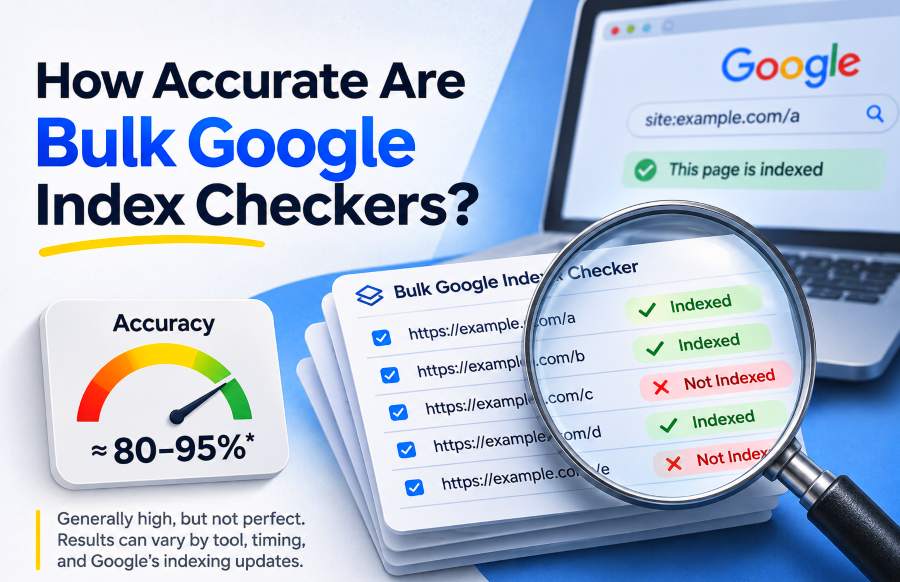
Bulk Google index checkers can return accurate results, but their reliability depends on how they detect indexed pages, which URLs you test, and how you verify the answers. Two checkers may agree with Google Search Console on the same pages yet behave differently when checking redirects, canonical variations, or recently changed URLs.
In a preliminary comparison conducted by the publisher, BulkIndexCheckr and IndexChecker.io each recorded 100% agreement with the Google Search Console reference results in their tested batches. SmallSEOTools recorded 0% agreement in the reported test, while UltraIndexer was excluded because the available route required registration.
These results are worth examining, but they do not establish universal accuracy. The underlying URL-level records and exact sample sizes were not available for independent review, and the tests did not establish equivalent workloads across all services.
TL;DR:
Bulk Google index checkers are useful for screening many URLs, but their results should not automatically replace Google Search Console verification. The publisher's preliminary test reported complete agreement for BulkIndexCheckr and IndexChecker.io, although the sample sizes and individual results are not yet independently auditable. For consequential indexing decisions, inspect the exact URL in Search Console, check canonical differences, and treat unconfirmed results as signals rather than final diagnoses.
How Accurate Were the Bulk Google Index Checkers in Our Test?
The comparison covered four services with different free-access conditions. The test operator reported that the reference URLs had been checked in Google Search Console before comparing the third-party outputs.
The recorded results were as follows.
1. BulkIndexCheckr — 100% Reported Agreement
BulkIndexCheckr allows users to check up to 50 URLs through its free public checker without creating an account.
In the publisher's preliminary test, BulkIndexCheckr returned classifications that reportedly matched every Google Search Console reference result in the tested batch.
The observed processing time was approximately 5 seconds.
For an SEO professional working with a list of 50 URLs, the practical advantage is that the entire list fits within one free batch. The public interface also distinguishes indexed, not-indexed, and failed checks, which matters because a failed request should not be mistaken for a confirmed indexing problem.
The reported agreement is encouraging, but it describes the tested URLs only. It does not establish that the checker will identify every non-indexed page, resolve all canonical variations, or maintain that agreement across different websites.
2. IndexChecker.io — 100% Reported Agreement
IndexChecker.io provides a free checker accepting up to 27 URLs at once without registration.
The publisher's test notes also recorded 100% agreement with the Google Search Console reference results for this tool, with an observed processing time of approximately 2.4 seconds.
That is a positive observation for the URLs tested. However, the smaller free batch capacity and the absence of a controlled, equivalent-size timing comparison prevent us from concluding that IndexChecker.io is universally faster or more accurate than BulkIndexCheckr.
Both tools performed well in the reported comparison. Neither demonstrated general accuracy beyond its tested sample.
3. SmallSEOTools — 0% Reported Agreement
SmallSEOTools' Google Index Checker accepts up to five URLs per check.
The publisher reported 0% agreement between its output and the Google Search Console reference classifications in the attempted test.
This was the weakest observed result, but it requires additional qualification. The original output records were not supplied, so we cannot independently determine how many classifications were incorrect, whether failed checks contributed to the result, or which indexing states were represented.
Consequently, the result should not be interpreted as proof that SmallSEOTools is always inaccurate. It establishes a reported failure to match the reference results under the particular testing conditions.
4. UltraIndexer — Not Tested
The available UltraIndexer registration page required account creation to continue into the service.
Because the comparison was limited to tools accessible through the attempted free workflow, UltraIndexer was not tested for accuracy.
Not tested is not the same as inaccurate. It would be misleading to assign UltraIndexer a percentage or rank it below tools that were actually checked.
What These Results Establish
The comparison provides useful firsthand observations, particularly about accessible free limits and the reported agreement with Google Search Console.
It does not yet establish a definitive ranking of checker accuracy. The full URL list, indexed versus non-indexed distribution, exact sample sizes for each tool, and individual outputs would be needed for a reproducible head-to-head benchmark.
The publisher operates BulkIndexCheckr, one of the products evaluated here. The results are therefore presented with their limitations rather than as an independent endorsement.
How to Verify Bulk Index Checker Accuracy Using Google Search Console
The strongest way to evaluate a bulk checker on websites you control is to compare its output against the indexed-state information provided by Google Search Console's URL Inspection tool.
Google's official URL Inspection documentation explains an important distinction: the indexed report describes what Google knows about the URL in its index, whereas the Live Test examines whether the current page may be indexable.
These are different questions.
A page can be accessible to Google's crawler today without having been indexed. Conversely, a page may have changed since Google last crawled it, so the indexed report and current live condition can disagree.
For a meaningful comparison, use the Google Index result as the reference for the indexing state, rather than treating a successful Live Test as evidence of inclusion in Google's index.
Step 1: Select a Representative Group of URLs
Avoid testing only popular pages that are already known to be indexed.
Include both indexed and non-indexed URLs, ideally from more than one verified website. Where practical, include a separate group of canonical alternatives, redirecting URLs, and recently updated pages.
The distinction matters because an easy sample can make an unreliable checker appear accurate. A checker that identifies indexed pages correctly might still struggle to recognize pages that are not indexed.
Keep special cases labeled separately so you can analyze ordinary URLs without hiding difficult cases.
Step 2: Record Google's Reference Status
Open Google Search Console, select the appropriate verified property, and inspect each complete URL.
Record the overall Google Index status, the detailed Page indexing reason, and the Google-selected canonical URL where available. Record the inspection timestamp as well.
A status such as URL is on Google supports classifying that exact URL as indexed in the reference dataset. A URL is not on Google result requires attention to the detailed reason, particularly when Google has selected a different canonical or the URL redirects.
The URL Inspection report also provides crawl information that can help explain discrepancies.
Step 3: Run the Same URLs Through Each Checker
Use exactly the same URL strings across the tools, including their protocols, hostnames, paths, trailing slashes, and query parameters.
Record whether each service returns Indexed, Not Indexed, Failed, Unknown, or another status. Do not silently convert a missing result into Not Indexed.
Where free limits differ, compare the common subset separately. For example, a tool tested on 27 URLs cannot be directly compared with one tested on 50 URLs unless their results are evaluated on an appropriately matched set.
Preserve the time and conditions of each batch. Indexing information can change, making tests performed on different days less comparable.
Step 4: Calculate Agreement and Classification Errors
For URLs with a clear binary reference status, classify the outcomes into four categories:
True positive: Both GSC and the checker report Indexed.
True negative: Both report Not Indexed.
False positive: The checker reports Indexed, but GSC reports Not Indexed.
False negative: The checker reports Not Indexed, but GSC reports Indexed.
Then calculate:
Agreement (%) = (True positives + True negatives) ÷ All comparable binary results × 100
A useful report should also show the proportion of GSC-indexed URLs correctly detected, the proportion of GSC-not-indexed URLs correctly detected, and the number of inconclusive or failed checks.
This makes the results more informative than one percentage alone.
The calculation measures agreement with GSC's recorded indexed state, not perfect knowledge of Google's constantly changing internal systems. Exact-URL and canonical differences must be interpreted separately where they affect what is being measured.
Why 100% Accuracy in a Small Test Can Be Misleading
One of the most important limitations of an accuracy comparison is the composition of the sample.
Consider a hypothetical checker that reports Indexed for every submitted URL, regardless of its real status.
If you test ten URLs and Google Search Console says all ten are indexed, the checker achieves:
10 correct results ÷ 10 tested URLs = 100% agreement
Now test the same behavior on a different sample containing five indexed URLs and five non-indexed URLs.
The checker correctly identifies all five indexed URLs but incorrectly classifies all five non-indexed URLs:
5 correct results ÷ 10 tested URLs = 50% agreement
The checker has not changed. Only the composition of the sample has changed.
This calculation demonstrates why high agreement on a small set is insufficient to establish general reliability. An accuracy study should disclose how many indexed and non-indexed URLs were included and how each category performed.
It also explains why the publisher's preliminary 100% observations should not be interpreted as evidence that either checker detects all indexing problems correctly.
A more useful comparison answers two separate questions: how often did the tool identify pages Google records as indexed, and how often did it correctly identify those Google records as not indexed?
For SEO agencies, the second question is especially important because a missed indexing issue may prevent the team from investigating a page that needs attention.
Why Bulk Google Index Checkers Disagree With Search Console
Differences between third-party results and Google Search Console do not always mean that one system has malfunctioned. Sometimes the systems are answering slightly different questions.
Google's Public Search Results Are Not a Complete Index Inventory
Some third-party checkers use public Google Search results to infer whether a URL is indexed.
A common approach involves the site: search operator. However, Google's documentation on the site: operator explicitly explains that these searches do not necessarily return every indexed URL.
That creates an important asymmetry.
Finding the exact page in Google's results provides useful evidence of search visibility. Not finding it does not conclusively prove that Google has removed it from the index.
This is one reason a third-party checker may report Not Indexed while Search Console records the URL as indexed.
Canonical URLs and Tracking Parameters Can Change the Interpretation
Google may associate several URL variations with one preferred canonical URL.
For example, a clean article URL might be indexed while a version containing utm_ tracking parameters is not separately indexed. A public checker could find the clean page and report success even though the submitted parameterized URL has a different exact-URL status in Search Console.
Redirects can produce a similar problem. If /guide redirects to /guide/, finding the destination does not necessarily mean Google indexed the original URL string independently.
Before labeling that result a tool error, determine whether you are measuring the exact submitted URL or the discoverability of its canonical destination.
Both measurements can be useful, but they should not be mixed in one accuracy percentage without explanation.
A Published 52-URL Test Demonstrates the Problem
A separate SearchOptimo bulk index checker study, published September 1, 2026, compared its public checker with Search Console URL Inspection API results for 52 URLs across six properties it owned.
The publisher reported 92.3% agreement, corresponding to 48 matching classifications and four disagreements.
According to its methodology notes, three disagreements involved pages the checker found in public search although Google's record for the exact submitted URL indicated otherwise. Two contained tracking parameters, and one redirected to a trailing-slash version.
The fourth involved a homepage Google recorded as indexed that the checker could not retrieve through its public search queries.
This independently published example demonstrates a consequential issue: even a seemingly straightforward Indexed or Not Indexed result may conceal a disagreement about the precise URL being assessed.
The SearchOptimo results are not directly comparable to our preliminary observations because the URL sets, sample composition, and testing methods differ. They are useful supporting evidence for understanding how disagreements arise, not proof that one named tool is more accurate than another.
Different Observation Times Also Matter
Search Console's indexed-state information is not a live crawl. A public checker may be observing search results at a different point in time.
If a page was recently published, redirected, updated, or removed, two checks can produce different results without representing the same underlying state.
For a fair accuracy test, record inspection times, perform checker runs close together, and revisit cases where the URL's status may have changed.
Speed, Free Limits, and Accuracy: What Actually Matters?
Accuracy is only one part of a useful bulk checking workflow.
The free interfaces inspected on November 1, 2026 advertised these capacities:
BulkIndexCheckr: Up to 50 free public URL checks, with no account required for the initial public workflow.
IndexChecker.io: Up to 27 URLs per free session without registration.
SmallSEOTools: Up to five URLs per check.
UltraIndexer: Account registration was required on the route inspected for this comparison.
For an agency checking 50 URLs, BulkIndexCheckr's free batch capacity covers the entire list at once. IndexChecker.io's advertised capacity is smaller, and SmallSEOTools requires much smaller batches. These limits describe individual free workflows; they do not establish that unlimited repeated submissions are available.
The preliminary observations also recorded 2.4 seconds for IndexChecker.io and 5 seconds for BulkIndexCheckr. Since the batch sizes and timing conditions were not established as equivalent, those figures are observations, not proof of superior processing speed.
For a practical decision, I would prioritize correct classifications, handling of failed results, free capacity, and an easy path to verify disagreements before placing much weight on a difference of a few seconds.
What to Do When a Checker Says a URL Is Not Indexed
A bulk index result is most valuable when it helps you choose the right next action.
Imagine an agency reviewing 50 client URLs. Its checker marks three as Not Indexed. That is a reason to investigate, not a reason to submit all three for indexing immediately.
The agency should follow a short verification procedure.
1. Inspect the Exact URL in Search Console
If you manage the property, inspect the complete URL under Google's indexed-state report.
If it is recorded as indexed, you already have an important disagreement to investigate. You do not need to assume that the page has disappeared from Google's index.
For properties you cannot access, record the checker result as unconfirmed and ask an authorized property owner to verify it when the distinction matters.
2. Check Google's Selected Canonical
Look for a different canonical, redirect destination, or alternate URL.
If Google intentionally indexed the canonical version rather than the submitted variation, the correct action may be to update the URL inventory or reporting rules rather than attempt to index both versions.
3. Review the Detailed Indexing Reason
If Search Console confirms that the intended canonical page is not indexed, examine its reported reason.
A page that Google has discovered but not yet indexed requires a different investigation from a page excluded by a noindex directive or a duplicate whose canonical differs.
For a more detailed walkthrough, see our guide on how to check if a page is indexed by Google.
4. Use a Live Test for Current Indexability Problems
A Live Test can help determine whether Google can currently access the page and detect certain indexing obstacles.
It does not prove that Google has already indexed the page. A successful result must not be counted as an Indexed classification.
If you have corrected a real technical problem, the Live Test can help evaluate the correction before taking any appropriate follow-up action.
5. Repeat the Check and Record the Outcome
After investigating the canonical and indexed-state details, rerun the third-party check if appropriate.
Record whether the disagreement persists, whether Google has changed its indexed-state information, or whether the original result concerned a different URL variation.
This process is more valuable than repeatedly submitting every URL marked Not Indexed.
For larger inventories, our guide to checking indexed pages in bulk explains how to organize a repeatable checking workflow.
Which Bulk Google Index Checker Should You Choose?
The preliminary comparison gives BulkIndexCheckr and IndexChecker.io positive results for their respective tested samples. It does not establish a universal accuracy winner.
For someone who needs to check up to 50 URLs through a no-registration public workflow, BulkIndexCheckr is a practical option because its current interface accommodates that volume, and the publisher's preliminary test reported agreement with the supplied GSC reference classifications.
IndexChecker.io is another reasonable candidate for smaller batches, with an equally positive reported agreement result in the test notes.
The SmallSEOTools result warrants caution because the publisher observed no agreement in its attempted batch, but the original records must be examined before diagnosing the nature of those disagreements. UltraIndexer cannot be judged from this test.
If you own the properties and need a definitive diagnosis of why a particular URL is not indexed, use Search Console's first-party information. For URLs belonging to other websites, use bulk checking as a screening tool and avoid treating the absence of a public-search match as conclusive proof.
You can check up to 50 URLs with BulkIndexCheckr and then verify any results that could affect an important SEO decision.
The question is not merely whether a checker returns an answer quickly. It is whether that answer is sufficiently supported for the decision you intend to make.